How to Hide the Clock on Mac — and Why Apple's Toggle Fails (macOS 26)
Can you hide the clock on Mac — in the menu bar or on the Lock Screen? You can tame the menu bar with a hack. The Lock Screen clock? Basically NOPE. Here's the honest truth per screen and why macOS needs a real toggle.
Available Workarounds
Menu bar — switch to analog / hide the date
Limited effectiveness Easy difficultyYou can shrink the menu bar clock to an analog dial and set the date to 'Never'. This changes the format — it does not remove the time.
Steps:
- System Settings → Control Center → Clock (Clock Options)
- Choose 'Analog' display
- Set 'Show date' to Never
Menu bar — third-party app (Bartender / Ice / Hidden Bar)
Partial effectiveness Easy difficultyMenu-bar managers can hide the clock item — but only in the menu bar, never on the Lock Screen.
Steps:
- Install Bartender, Ice (free), or Hidden Bar
- Configure it to hide the clock
Can you hide the clock on Mac? Short answer: not really
Many articles claim macOS lets you hide the clock. That’s misleading. You can disguise the menu bar clock with a third-party app. And the Lock Screen? There’s a setting that’s supposed to hide the clock — buried under Wallpaper, of all places — and it doesn’t even work. A clean, native “hide the clock” switch that actually does something? It doesn’t exist.
Can you hide the clock in the Mac menu bar? Only by installing other software
Here’s where it gets genuinely absurd. Apple’s only official option to “deal with” the menu bar clock is to switch it to an analog dial (System Settings → Control Center → Clock Options) — a tiny round clock that, surprise, still shows you the time. You can also set Show date to Never. That’s the entire native toolkit: change the shape of the clock, or drop the date. Neither actually removes the time.
To genuinely hide it, you have to install a third-party app — Bartender, Ice (free), or Hidden Bar — and let it tuck the clock away. Even then, it only works in the menu bar.
Sit with that for a second:
The only way to remove a clock from your own Mac’s menu bar is to download extra software. Apple’s official answer is: make it round.
Why is this so hard for Apple? (It isn’t.)
That’s the maddening part. macOS already lets you hide dozens of menu bar items — Wi-Fi, Bluetooth, battery percentage, Spotlight, Sound, Now Playing, you name it. Every one of them has an on/off switch. The clock is the single exception with no way to turn it off.
There is no technical obstacle here. A “Hide clock” checkbox sits a few lines of code away from settings Apple already ships. They built the toggle for everything around the clock. They just refuse to build it for the clock itself.
Can you hide the clock on the Mac Lock Screen? NOPE — and this one’s almost unbelievable
Lock your Mac, wake it from sleep, or start it up, and a clock greets you every single time. Here’s the part that’s hard to believe.
There’s a setting that claims to turn it off — and it doesn’t even work.
First, it isn’t where any sane person looks. It’s not under System Settings → Lock Screen. In macOS Tahoe (26) the toggle is buried under:
System Settings → Wallpaper → “Clock Appearance” → “Show large clock” → Never
Under Wallpaper. For a Lock Screen clock. That alone is why half the internet wrongly claims “it can’t be done” — everyone checks Lock Screen, where it isn’t.
But here’s the kicker: set it to Never and the clock is still there. We verified it on a real Mac — the preference is even flipped at the system level (UsesLargeDateTime = 0), and the time still shows on the lock screen. The toggle only drops the oversized format; a clock stubbornly remains.
So the one official setting that’s supposed to remove it — even forced through Terminal — does not actually remove the clock. There is no way, GUI or command line, to get a truly clock-free lock screen on a Mac. Let that sink in: Apple shipped a switch for this, hid it under Wallpaper, and it doesn’t even work.
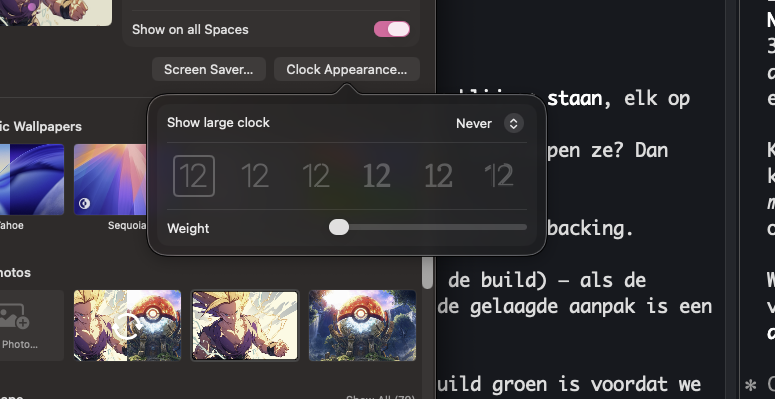
Set to "Never" — and hidden under Wallpaper, not Lock Screen.
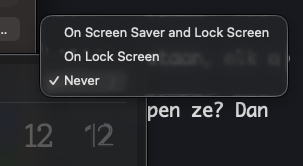
Apple literally offers "Never"… and the clock stays on the lock screen anyway.
Can you hide the clock on the Mac login screen? NOPE
Same story at startup and the login window — the time is shown, with no reliable way to turn it off.
The inconsistency
Apple gives you extensive customization elsewhere: custom wallpapers, widgets, Focus modes, Do Not Disturb, Screen Time. But a dependable “hide the clock” — especially on the Lock Screen? Missing. That gap isn’t technical; it’s a choice.
Compared to iPhone
If you think Mac is frustrating, iPhone is worse — there you can’t even hide the menu bar / status bar clock with a third-party app. Neither platform offers a true, reliable clock-hiding option for the Lock Screen.
This is absurd. We just need a toggle.
A third-party app for the menu bar. A Lock Screen setting that doesn’t actually work. Nothing for the login screen. All to not see the time on your own Mac.
One honest switch would fix it:
System Settings → Lock Screen → Hide the clock (and a matching menu-bar toggle). On, off, done — and it should actually work.
What You Can Do
- Submit feedback to Apple — apple.com/feedback
- Sign the petition — join the movement
- Spread awareness — share #RightToTimelessness
Frequently Asked Questions
Can I fully hide the clock on the Mac menu bar?
Not natively — you can only switch to analog or hide the date. To actually hide it, use a menu-bar manager like Bartender, Ice, or Hidden Bar. That covers the menu bar only.
Is there any setting to hide the Mac Lock Screen clock?
There’s a setting that claims to — “Show large clock → Never” — and it’s hidden under System Settings → Wallpaper → Clock Appearance (not Lock Screen, oddly). But it doesn’t actually work: even set to Never, and even forced at the system level (UsesLargeDateTime = 0), the clock still appears on the lock screen. It only removes the oversized format. There is no way — GUI or Terminal — to fully hide it.
Why can Windows hide the taskbar clock but Mac can’t hide the menu bar clock natively?
There’s no technical reason. It’s a design choice — which is exactly what the petition is trying to change.
Want this to change?
Join the movement demanding the right to hide the clock on all devices.
Sign the Petition